A WordPress theme is not a look. It is a set of constraints you are renting for the next two years. Once you know that, buying one is a good decision, and for most sites of ten to twenty pages it is the right decision.
We build custom themes and we still say this, because projects that start with the wrong expectation hit trouble in month four rather than month one.

Test the demo yourself before you pay
The seller gives you screenshots and a feature list. What they do not give you is page weight. Take it yourself:
lighthouse https://demo.example.com/ --form-factor=mobile \
  --throttling-method=simulate --only-categories=performance
If the command line is not your thing, drop the same URL into PageSpeed Insights and read two numbers: total weight and LCP. The demo runs on the vendor's own tuned hosting, so what you see is the best that theme will ever do. Your site will not beat it.
A reasonable demo comes in under one megabyte. If the demo is two, yours will be three once real images and real plugins arrive.
One measurement, and its limit
On 15 August 2026 we ran Lighthouse 12.8.2 on mobile against the three pages ranking first to third for the Persian query meaning "WordPress theme".
| Page | Score | LCP | CLS | Weight |
|---|---|---|---|---|
| rtl-theme.com | 65 | 11.2 s | 0.025 | 1852 KiB |
| mihanwp.com/themes | 92 | 2.4 s | 0.137 | 655 KiB |
| zhaket.com | 35 | 9.0 s | 0.202 | 1813 KiB |
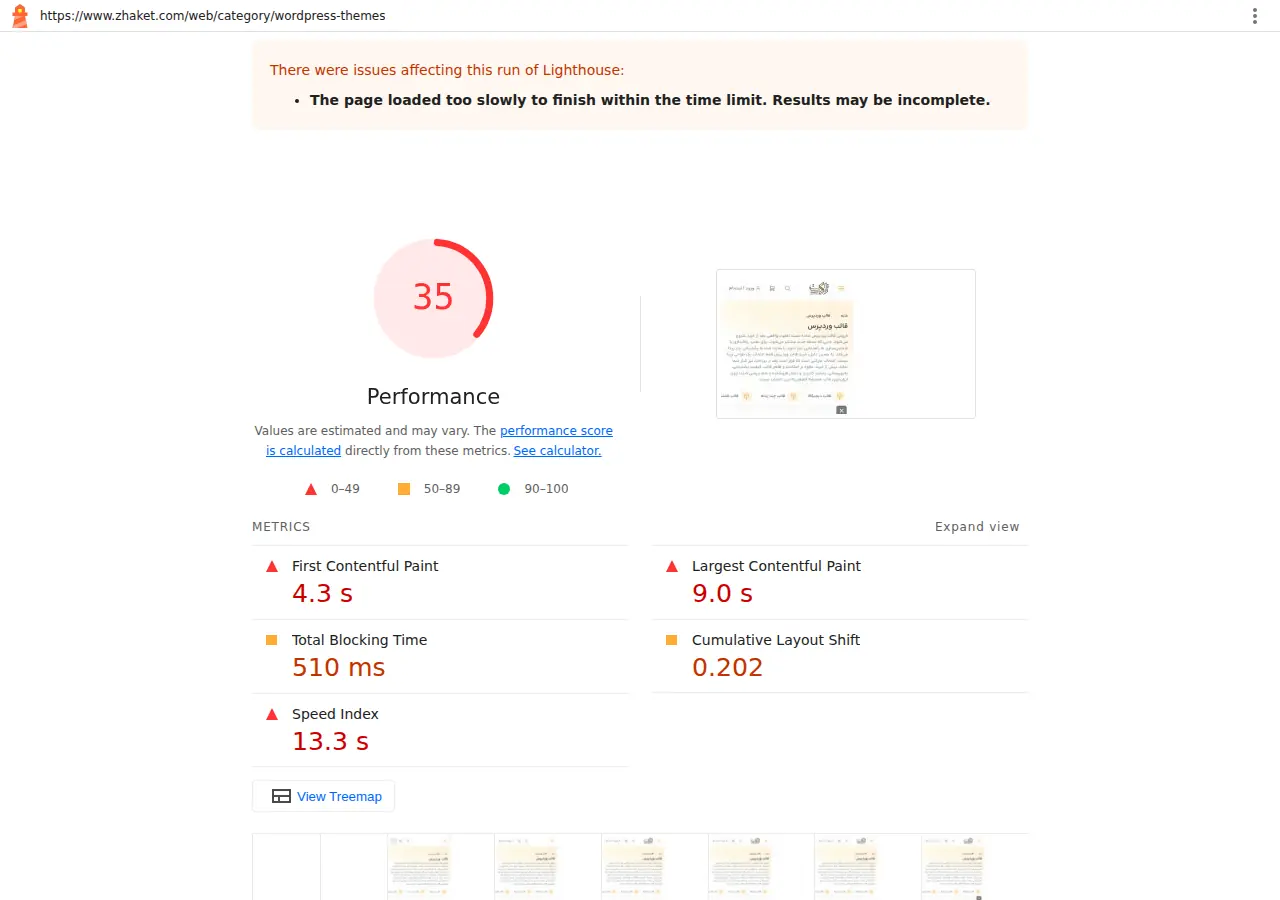
Before drawing anything from it, note what the image itself shows: Lighthouse flagged the zhaket.com run as possibly incomplete. Read 35 with that margin attached.
Now the limit of that table, which matters more than the table. These numbers belong to the shop's own page, not to the themes it sells. A slow shop does not necessarily sell slow themes, or the reverse. Anyone selling you this as a ranking of theme quality is proving something they have no data for.
So why include it? Because it shows how wide the gap gets between two pages doing similar work: 655 KiB against 1852. The same spread exists between two themes, and the only way you see it is by testing the demo.
Free themes: safe here, dangerous there
A free theme from the official WordPress repository is fine. The code has been reviewed, it receives updates, and you can build on it.
What is not fine is a nulled commercial theme, a paid theme with its licence check stripped out and redistributed for free. You buy three things at once: code somebody modified, a site that will never receive another security update, and usually a backdoor that sits quietly for months.
This is the one place we will be blunt. Saving the price of a licence against the cost of cleaning an infected site is not a trade. Read the signals an infected site gives off and then decide.
Four things to ask before buying
When was the theme last updated. A theme untouched for eighteen months will break against the next WordPress release, and nobody is going to fix it.
How many bundled plugins does it require. Some themes only work with six companion plugins and you cannot deactivate any of them. Those six are your speed budget.
Does the demo exist in the language you will publish in. Font subsets that drop characters, headings that break, forms laid out for a different script: none of this shows up in a feature list and all of it shows up in a demo.
What happens if you stop renewing the licence. The right answer is that the site keeps working but stops receiving updates. If the answer is anything else, do not buy that theme.
The real cost lands in year two
Everyone sees the sticker price. What is not on the invoice:
| Item | When it surfaces |
|---|---|
| Annual renewal of the theme and its bundled plugins | Year two |
| Optimising away what the theme made heavy | When speed becomes a problem |
| Builder lock-in when you change themes | At redesign |
| Customisations wiped by an update | The first update |
The last one is the most common and the fix is simple: every change goes in a child theme, never in the theme itself. If someone is setting up your site and has not created one, ask about it before handover.
When a bought theme stops working for you
When you have a process no theme contains: product configuration, pricing with several variables, a multi step signup wired into your internal system. You can bolt these on with plugins and the result is the thing nobody dares touch a year later.
And when your brand is defined enough that looking like everyone else costs you. If your customer sees ten sites in an afternoon and they all look the same, the theme is costing you money rather than saving it.
Common questions
Cheap theme or expensive one
Price is a weak signal. Last update date and demo weight are strong ones, and both are free to check.
Can a bought theme reach good Core Web Vitals
Yes, if the theme is light and you control the images. We explain what each metric measures in the plain version of LCP, INP and CLS. The ceiling is lower than a custom build, and for a brochure site it is high enough.
How many plugins is too many
There is no magic number. What matters is how many pages each plugin loads on. One heavy plugin running everywhere is worse than ten small ones that do not.
Where to go next
If you have not decided which route suits you, the cost breakdown of building a site puts the figures side by side. And if you want to know how much of a theme's speed is really the theme and how much is the server, the share hosting takes in your speed numbers has the answer.
If this list leads you to conclude that a bought theme will not carry your requirements, building on a custom theme with no page builder is what we do. And if it leads you the other way, buy the theme. There is no more honest way to put it.
Sources
- The official WordPress child theme documentation for why changes belong there
- How the Lighthouse score is calculated for reading the number your demo returns
Measurements were taken on 15 August 2026 with one cold run per URL.


Comments & Questions
Have a question about this article? Ask, we'll answer.
No comments yet; be the first.