A PWA is your site plus a manifest file and a few technical conditions, which together let a phone install it and give it an icon. Everybody writes that part. What nobody had checked is whether those manifests work: we collected 20 of them from 111 Iranian pages and opened every one. Six failed Chrome's installability conditions, and one of the six returned a 404.
That last one is the most instructive. A site sitting at position three in Google for the query "what is a PWA", teaching readers what a PWA is, links in its own head to a manifest that does not exist.

What Chrome actually asks for
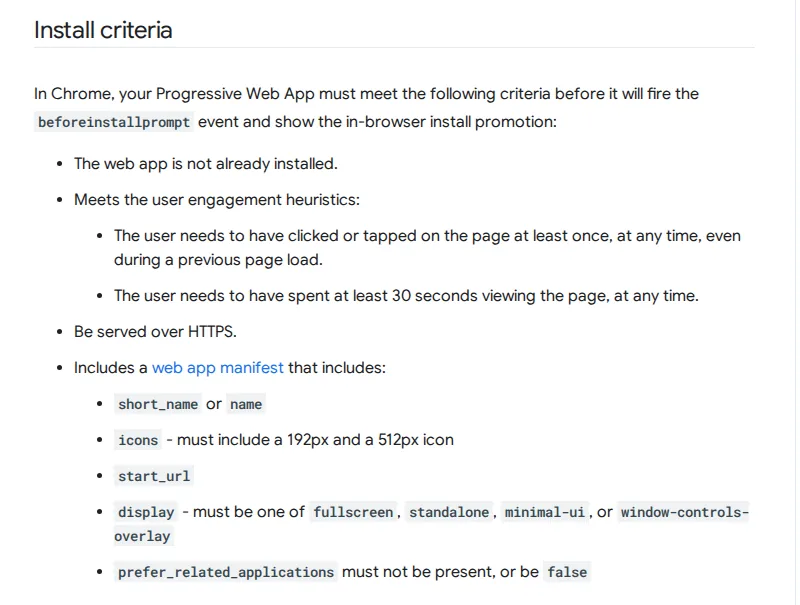
The installability criteria page on web.dev, last updated 19 September 2024, carries a short list. The manifest needs a name or a short_name. It needs an icon at 192 pixels and an icon at 512. It needs start_url, and a display value of fullscreen, standalone, minimal-ui or window-controls-overlay. The key prefer_related_applications must not be true. The page has to be served over HTTPS, and the user has to have interacted with it once and spent around thirty seconds on it.
One thing is absent from that list and present in most articles about PWAs: the service worker. The official criteria page does not include it among the installation conditions.
The distinction matters more than it sounds. Teams write a service worker, then wonder why no install prompt appears, when the fault is three lines higher in the manifest file.
None of which makes service workers pointless. What one does is keep the site usable with no connection or on a bad one. So a service worker is what makes a PWA useful, not what makes it installable, and swapping those two around is the most common misunderstanding in this corner of the web.
What 20 manifests looked like
The method was plain. We read 111 Iranian pages that rank in Google for seven different queries, took the URL out of every <link rel="manifest"> tag we found, fetched each file and tested its values against the list above.
Of 20 unique manifests, 14 satisfied all five manifest conditions. The other six broke down like this: three files had neither name nor start_url, two were missing only start_url, and one answered with a 404. The point that outlives the numbers is that not one of those six failures is visible on the site. The page loads perfectly. The install button simply never appears.
The subset that writes about PWAs is where it gets awkward. Of the 18 pages ranking for the query, 5 ship a manifest and 6 register a service worker. Two thirds of the pages teaching you to build a PWA have not built one.
The three failures that actually happen
- The manifest path is wrong. The file moved, or sits under a different directory, and the link in the head was never updated. The browser reports nothing; it just declines to offer installation.
- No
start_url. Off-the-shelf plugins often generate a site.webmanifest that is sufficient for favicons and insufficient for installation. - No 512-pixel icon. The 192 exists because Android needed that size anyway, but the splash screen wants the 512.
- The manifest is behind a login or a firewall rule. Rare, and completely invisible until someone fetches the file as an anonymous visitor.
displayleft at browser. A valid value, and the one value that guarantees no install prompt.
All of them surface in about two minutes. Open Chrome DevTools, go to the Application tab, click Manifest. If the file cannot be found or a field is missing, it is written there in plain language. This is the rare technical check a non-developer running a site can genuinely do alone.
Do you need a PWA at all
We sell app development and we will still say it: for most of the businesses that talk to us, the answer is no. A PWA earns its keep when the user is a returning user. A shop whose customer visits once a month gains nothing from an icon on a home screen, because that customer comes back through Google anyway.
Where it genuinely works looks different: a customer portal, a reordering system, an internal tool for staff, anything opened several times a week by someone who would rather not retype a URL. There a PWA beats a native app on economics, since it carries no store submission and no update cycle.
One limitation to know before deciding. On iOS the install happens through Safari's Add to Home Screen, and some capabilities, notifications among them, behave differently. If your whole argument for a PWA is push notifications, test that on the exact devices your customers carry before anybody writes code.
Fix the site before you wrap it
A PWA over a slow site is a slow site with an icon. None of the conditions above touch performance, so the browser installs it without complaint and the user waits exactly as long as before. If your LCP is over two and a half seconds, the order of work is: the Core Web Vitals thresholds first, manifest second.
On the projects we have seen, the budget spent on turning a site into an app would usually have bought several times the result in site speed work. The real decision is rarely which of the two is better. It is which of the two comes first.
How does a PWA differ from an Android app?
An Android app is a separate installable package, delivered from a store or an APK, with fuller hardware access. A PWA is your site, opened by the browser in its own window: no separate package, no release process.
Does a PWA help SEO?
Not directly. A manifest is not a ranking signal. The indirect effect comes from the fact that speed and stability work usually rides along with a PWA project, and those do matter.
Can WordPress do this?
Yes, through a plugin or a few lines in the theme. The catch is that plugin output needs the same check described above. In our sample, one plugin-generated manifest had no start_url.
How do I confirm mine works?
The Application tab in Chrome DevTools for the manifest, and Lighthouse for the broader report. After both, test on a real handset. A desktop emulator does not reproduce install behaviour faithfully.
If the web version and the app version are meant to be one thing, that belongs to the architecture stage rather than to month six. A site built to do the job of an app is put together differently from the start, and our build process shows where that decision sits on the timeline.
Method: 111 Iranian pages ranking organically in Google for seven related queries, read on 16 August 2026 from a server in Helsinki. Every <link rel="manifest"> URL was extracted and each file fetched separately, producing 20 unique manifests. Pages that inject the manifest with JavaScript do not appear in this count, so 20 is a floor rather than a ceiling.
Criteria taken from the installability criteria page on web.dev, field definitions from the MDN manifest reference.



Comments & Questions
Have a question about this article? Ask, we'll answer.
No comments yet; be the first.