
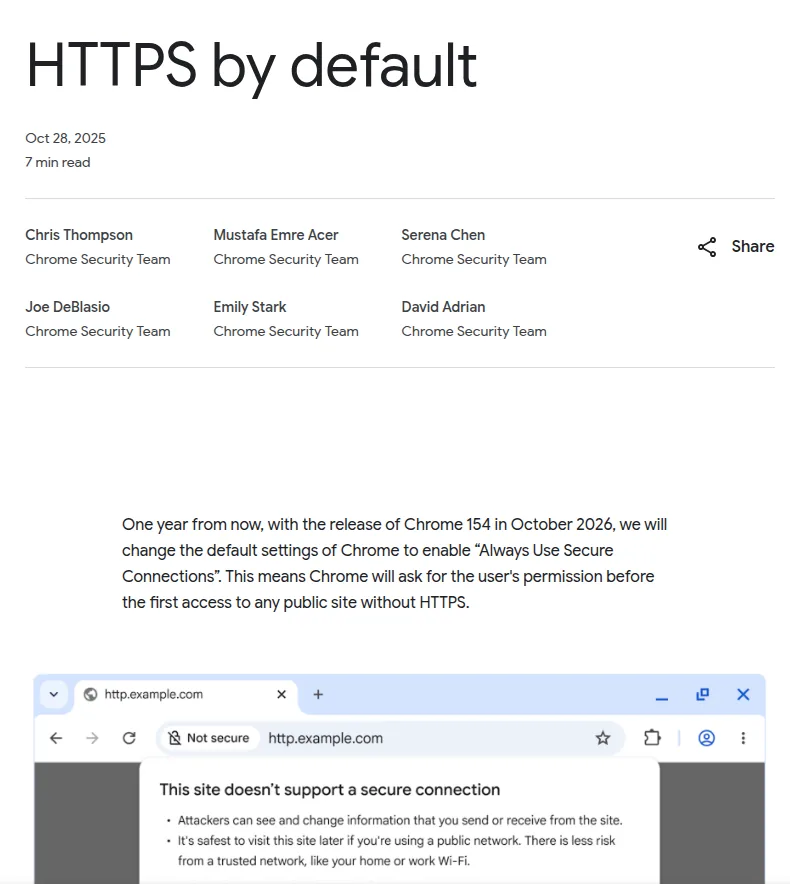
From October 2026 Chrome will ask the user for permission before opening any public site that is not on HTTPS. The setting is called Always Use Secure Connections, it becomes the default in Chrome 154, and it has already been on since Chrome 147 in April 2026 for everyone using Enhanced Safe Browsing.
The part that catches people out: this has nothing to do with a broken certificate. A site with a perfectly valid certificate still triggers the interstitial if its http address continues to answer.
What Chrome actually does, and what it leaves alone
On an http navigation the browser shows an interstitial instead of the page, says the site does not support a secure connection, and offers to continue or go back. The choice is remembered per domain rather than per page.
Google's own figures put HTTPS navigations in the 95 to 99 percent range already, and above 99 percent on Android and Mac when you count public sites only. So for the overwhelming majority of sites this changes nothing at all. For the remainder it changes everything about the first visit.
Three categories sit outside the change, and the announcement is explicit about them: private network addresses such as 192.168.0.1, single-label hostnames with no dot in them, and corporate intranets. The reasoning is practical rather than generous, because getting a publicly trusted certificate for a name that is not public is still awkward. If your internal admin panel runs on http, nobody is coming for it. If your public site answers on http, they are.
We tested 38 sites and five are not ready
On 15 August 2026 we requested the http address of 38 Iranian sites and recorded which of them move you to https. Thirty-one return a permanent 301, which is the correct behaviour. One returns a temporary 302 and one did not respond at all.
Five return a 200 and real content over plain http, with no redirect anywhere: hostiran.net, parsvds.com, mizfa.tools, yektanet.com and triboon.net. We repeated that with a GET as well as a HEAD, because some servers answer the two differently and we did not want to name anyone on a quirk.
What that means in practice is narrow but real. Any inbound link written as http stays http, and from Chrome 154 that visit opens with a warning screen instead of the site. Old links on other people's sites, bookmarks saved years ago, addresses printed on packaging or pasted into a messenger all land in that bucket.
The advice everyone repeats, which is no longer your problem
Almost every article about HTTPS tells you to hunt for mixed content: images and scripts still loading over http inside an https page. We measured that across the same sample and the result went against the advice.
One genuinely insecure subresource turned up in the entire set: a single image on parsvds.com still requested over http. Everything else that looked like mixed content at a glance was the rel="profile" link to gmpg.org that WordPress themes have carried for years, which is a metadata reference and never actually fetched.
If your time is limited, do not spend it auditing for mixed content. Spend it confirming that http on your own domain redirects. The problem moved and the checklists did not move with it.
The one command worth running
curl -sI http://example.com/ | head -n 1A 301 means you are done. A 200 means your web server is still serving over http and you need a permanent redirect to https. After that, switch on the HSTS header so the browser stops trying http in the first place; that is what keeps a user from ever meeting the interstitial, rather than merely surviving it.
Our own site answers http with a 301 and sends Strict-Transport-Security: max-age=31536000. We say so because anyone can check it with the line above, and advice the author has not applied to their own domain is not worth reading.
When this warning is not about your certificate at all
If your visitors are already seeing "your connection is not private" today, this announcement is not your problem. That message comes from an expired certificate, a name mismatch or an incomplete chain, and it is costing you visitors right now rather than in October. The certificate types and what the common errors mean is a better place to start for that.
One more boundary worth stating plainly: these dates belong to Chrome. Other browsers have travelled the same road, but the version numbers and months above are Chrome's and should not be generalised to all of them.
Questions people ask
Does an SSL error mean I have been hacked? Usually not. Most of the time the certificate expired or was issued for the wrong name. If other things changed at the same time, though, look separately at the signals that genuinely point to a compromise.
Will redirecting to https hurt my rankings? No, provided it is a 301 rather than a 302 and every variant of the address ends at one final URL. Long redirect chains cost you something; the redirect itself does not.
Is a free certificate enough for this? Yes. Chrome draws no distinction between free and paid certificates, and the warning only cares whether a secure connection exists.
If you would rather have someone check this from the outside, a security review of your site is part of what we do, and the redirect, HSTS and the certificate are all covered in the same pass. Issuing and installing an SSL certificate can be ordered on its own. On a new build all of this is configured on day one, which is by far the cheapest moment to do it and one of the reasons a site built with the configuration right from the start costs less over its life.
The dates and percentages come from the Chrome security team's own announcement of HTTPS by default. The 38-site measurement was taken on 15 August 2026, and the sites named above may well have added their redirect by the time you read this.



Comments & Questions
Have a question about this article? Ask, we'll answer.
No comments yet; be the first.